
What Is a Bitcoin Node and Why You Need One: Complete Guide for Beginners
- 29 Dec 2025
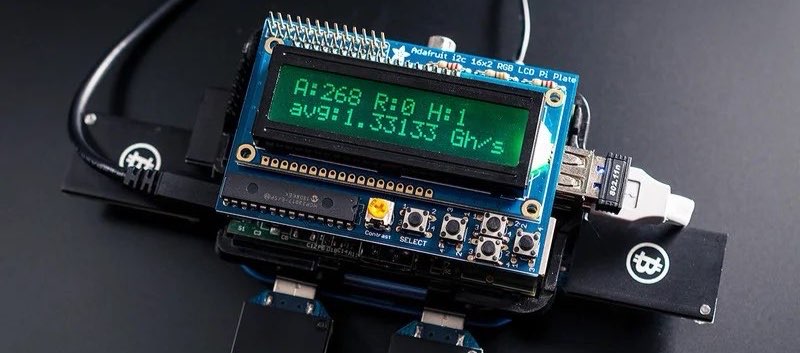
Bitcoin’s strength lies in its decentralization, and at the heart of that decentralization are Bitcoin nodes. While most people interact with Bitcoin through exchanges or lightweight wallets, running your own node gives you true independence and helps secure the network.
This beginner-friendly guide explains exactly what a Bitcoin node is, the different types available in 2026, why you might want to run one, and practical ways to get started. We’ve expanded this guide with additional insights on advanced integrations and resources to help you build a complete node ecosystem.
What Is a Bitcoin Node?
A Bitcoin node is any computer running Bitcoin software (usually Bitcoin Core) that:
- Downloads and stores a complete copy of the Bitcoin blockchain
- Independently validates every transaction and block according to Bitcoin’s consensus rules
- Relays valid blocks and transactions to other nodes
Nodes form the peer-to-peer network that makes Bitcoin truly decentralized—no company or government controls it.
There are roughly 18,000–23,000 reachable full nodes worldwide as of late 2025, with many more running privately. This number has been steadily increasing as more users recognize the importance of contributing to the network’s health.
Types of Bitcoin Nodes
-
Full Archival Node
Stores the entire blockchain (~600–650 GB in 2026) and fully validates everything from the genesis block onward. Most secure and private option. Ideal for users who want to maintain a historical record and perform in-depth analysis. -
Pruned Node
Fully validates transactions but deletes older blocks after verification. Uses only 10–15 GB of space while maintaining high security. This is a great balance for most home users with limited storage. -
Light/SPV Nodes
Used in mobile wallets (e.g., Electrum, BlueWallet). They rely on full nodes for data and offer less privacy and security. While convenient, they don’t contribute to the network’s decentralization.
Running a full or pruned node is what most people mean when they say “run your own Bitcoin node.” For those interested in scaling up, consider integrating with Layer 2 solutions like the Lightning Network, as detailed in our How to Set Up a Bitcoin Lightning Network Node.
Why Run Your Own Bitcoin Node in 2026?
You don’t need a node to own or use Bitcoin, but running one offers powerful benefits:
1. Maximum Privacy
When you use a third-party wallet or block explorer, they can see:
- Your IP address
- Which addresses you’re checking
- Your full transaction history
Your own node queries the blockchain directly—no one spies on your activity. In an era of increasing surveillance, this level of privacy is crucial for protecting your financial sovereignty.
2. True Trustless Verification
You personally enforce Bitcoin’s rules (21 million cap, valid signatures, no double-spends). You don’t have to trust any exchange, wallet provider, or developer. This “don’t trust, verify” ethos is at the core of Bitcoin’s philosophy.
3. Improved Security for Your Wallet
Connect your hardware wallet (Ledger, Trezor, Coldcard) or software wallet (Electrum, Sparrow) directly to your node. Broadcast transactions privately and avoid fake data from malicious servers. This setup minimizes risks from man-in-the-middle attacks.
4. Contribute to Bitcoin’s Resilience
Every honest node makes the network stronger and more censorship-resistant. You help decentralize Bitcoin, ensuring it remains robust against potential threats from centralized entities.
5. Future-Proofing
As Bitcoin grows, relying on third-party infrastructure becomes riskier. Your node ensures you always have direct access. With upcoming protocol upgrades, running a node positions you to adapt seamlessly.
Additionally, nodes can serve as the foundation for more advanced features, such as routing payments on the Lightning Network, which can even generate small fees for you.
Hardware and Software Requirements (2026)
Running a full node is more accessible than ever:
- Storage: 650 GB+ free space (1–2 TB SSD recommended for future growth)
- RAM: 4 GB minimum, 8–16 GB ideal
- Internet: Reliable connection with decent upload speed (no strict data cap needed—initial sync uses ~600 GB download, then ~20–50 GB/month)
- Device options:
- Old laptop/desktop
- Raspberry Pi 5 (with external SSD)
- Dedicated mini-PC (e.g., Intel NUC)
- Pre-built solutions like myNode, RaspiBlitz, or Start9 Embassy
Software: Bitcoin Core (free, open-source, most widely used). Alternatives include Knots or custom implementations.
For detailed comparisons and recommendations on the best hardware setups, check out our Best Hardware for Running a Bitcoin Node in 2026. If you’re leaning towards a compact, energy-efficient option, our How to Set Up a Bitcoin Node on Raspberry Pi provides a hands-on tutorial.
Easy Ways to Get Started
Option 1: Bitcoin Core on a Computer
- Download Bitcoin Core from bitcoincore.org (verify signatures!)
- Install and launch—it begins syncing automatically
- Wait for initial sync (1–7 days depending on hardware/internet)
- Connect your wallet (Electrum, Sparrow) to your node for private use
Option 2: Plug-and-Play Solutions (Recommended for Beginners)
- myNode or RaspiBlitz: Turn a Raspberry Pi into a full node + bonus apps (Lightning, Electrs)
- Start9 Embassy: User-friendly device with beautiful interface
- Umbrel: Popular home server with node + apps (podcasting, media, etc.)
These come with one-click Bitcoin node setup and take minutes to configure. Many of these solutions also support easy Lightning Network integration, which you can explore further in How to Set Up a Bitcoin Lightning Network Node.
Advanced Considerations
Once your node is up and running, consider enhancing it with privacy tools like Tor for anonymous connections or integrating it with personal servers for additional services. Monitoring tools can help track your node’s performance and uptime. For those interested in earning from their node, opening Lightning channels allows you to route transactions and collect fees, turning your setup into a productive asset.
Common Myths Debunked
- “It costs a lot” → A basic setup costs $200–400 one-time
- “It uses too much electricity” → Comparable to a light bulb (~10–30W)
- “I don’t have technical skills” → Modern solutions are point-and-click
- “It’s only for experts” → Beginners can start with guided setups and scale up as they learn
Final Thoughts
Running a Bitcoin node is one of the most meaningful ways to participate in Bitcoin beyond just buying and holding. It aligns perfectly with self-custody principles covered in our Security & Privacy pillar, especially when paired with hardware wallets and secure seed phrase storage.
Whether you choose a simple pruned node on an old computer or a full-featured Umbrel setup, you’ll gain privacy, independence, and the satisfaction of strengthening Bitcoin.
Start small—your future self (and the network) will thank you.
This article is part of our Bitcoin node cluster. For more in-depth guides, see:
- How to Set Up a Bitcoin Node on Raspberry Pi
- Best Hardware for Running a Bitcoin Node in 2026
- How to Set Up a Bitcoin Lightning Network Node
For more on Bitcoin fundamentals, revisit How to Buy Bitcoin for Beginners and Bitcoin vs Ethereum.
Stay in the loop →
Powered by EverRank, and created by GalaxyBuilt
Get Weekly DeFi Alpha in Your Inbox
Weekly DeFi Alpha
56k+ traders getting my private newsletter every week
Join To Download our Ebook Free
Read Next_

Best Hardware for Running a Bitcoin Node in 2026: Reviews and Recommendations
Compare the top hardware options for Bitcoin nodes in 2026, from Raspberry Pi to dedicated servers. Focus on performance, cost, and privacy.

Genlayer: The "AI Co-Processor" for Blockchains and Your Ticket to the Future of Crypto Work
Genlayer brings verifiable AI intelligence to any blockchain using zkML, unlocking subjective prediction markets, on-chain credit scoring, dynamic NFTs, autonomous agents, and much more.
How to Set Up a Bitcoin Lightning Network Node: Beginner's Tutorial for 2026
Step-by-step instructions to set up a Lightning Network node on Bitcoin in 2026. Boost transaction speed and privacy while earning fees.