
How to Set Up Trust Wallet: Step-by-Step Tutorial for Beginners
- 29 Dec 2025
I first started using Trust Wallet in 2021, when I started trading bsc memecoins, and I even had friends who launched their own coins. I was having lots of fun in defi playing around on binance smart chain because the gas fee’s were really cheap. I learned to trust Trust wallet.
Trust Wallet is one of the most widely used mobile non-custodial wallets in 2026, trusted by millions of beginners and experienced users alike. It supports over 10 million assets across 100+ blockchains—including Bitcoin, Ethereum, Solana, BNB Chain, Polygon, Avalanche, and many more—making it a true all-in-one solution.
Key features include built-in Web3 browser for dApps, direct token swaps, NFT management, staking for rewards, and easy crypto purchases. As a fully self-custodial wallet, you control your private keys and recovery phrase—no third party can access your funds.
This aligns perfectly with the self-custody principles in What is Cryptocurrency? A Complete Beginner’s Guide to Blockchain in 2026. In this guide, we’ll walk you through setting up Trust Wallet from scratch, securing your recovery phrase, and getting ready for your first transactions—while avoiding the 10 Biggest Crypto Mistakes Beginners Make in 2026.
Why Choose Trust Wallet as a Beginner?
Trust Wallet stands out for new users because:
- Massive Chain Support: One app for almost every major blockchain and token.
- Beginner-Friendly Interface: Clean design with simple navigation.
- Built-in Tools: Buy crypto with fiat, swap tokens, stake for yields, browse dApps, and collect NFTs—all without leaving the app.
- Strong Security: Local encryption, biometric locks, and no KYC required.
- Free and Open-Source: No hidden fees for basic use, with transparent code.
For a full comparison, see Best Crypto Wallets for Beginners in 2026: Top Picks and Reviews. If you’re focused on Ethereum, compare with How to Set Up MetaMask Wallet: Step-by-Step Tutorial for Beginners 2026, or for Bitcoin Ordinals with How to Set Up Xverse Wallet: Step-by-Step Tutorial for Beginners 2026.
Prerequisites Before Starting
- A smartphone (iOS or Android)—Trust Wallet is mobile-first (no official browser extension).
- A private, quiet place to write down your recovery phrase.
- Paper and pen—never store the phrase digitally at first.
Step-by-Step Guide to Setting Up Trust Wallet
The setup takes just a few minutes.
Step 1: Download Trust Wallet from Official Sources
Always use official channels to avoid fake apps:
- iOS: App Store – Search “Trust: Crypto & Bitcoin Wallet” or visit https://apps.apple.com/app/trust-crypto-bitcoin-wallet/id1288339409
- Android: Google Play Store – Search “Trust Wallet” or visit https://play.google.com/store/apps/details?id=com.wallet.crypto.trustapp
Warning: Only download from these links or the official site https://trustwallet.com. Fake apps on third-party stores can steal your funds.
Step 2: Install and Open the App
- Install the app and open it.
- You’ll see the welcome screen with two main options: Create a new wallet or I already have a wallet (for importing).
Step 3: Create a New Wallet
- Tap Create a new wallet.
- Read and accept the terms (emphasizing self-custody responsibility).
- The app generates a 12-word secret recovery phrase.
- Write down the words exactly in order on paper. Do not screenshot, type into notes, or share with anyone.
- Confirm by selecting the words in the correct sequence.
This phrase is your master key—if you lose your phone, it’s the only way to recover your assets. Store it offline in a secure location.
For safe handling tips, see How to Transfer Crypto from Exchange to Wallet Safely in 2026.
Step 4: Secure Your Wallet
- Enable passcode (6-digit PIN) — required for extra protection.
- Turn on biometrics: Face ID (iOS) or fingerprint (Android) for quick, secure access.
- Trust Wallet encrypts everything locally—no data is sent to servers.
Step 5: Explore the Dashboard
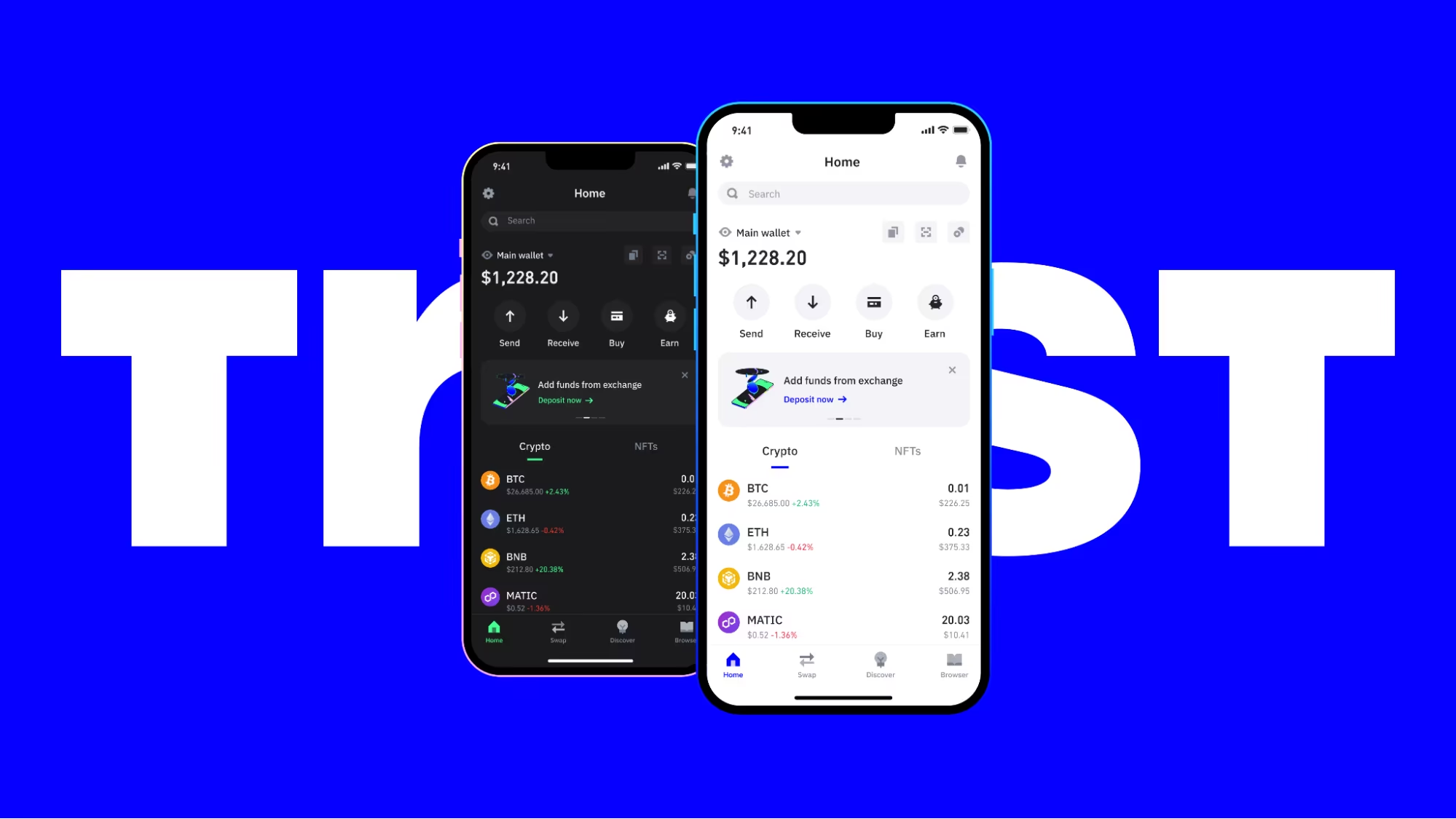
- Your home screen shows total portfolio value and top assets.
- Use the search bar to add tokens or switch networks.
- Tap Receive to view addresses for any supported chain (e.g., BTC, ETH, SOL).
Trust Wallet automatically detects and supports most popular tokens.
Step 6: Fund Your Wallet (Optional Test)
To verify everything works:
- Use the Buy feature: Purchase crypto directly with credit card, Apple Pay, Google Pay, or bank transfer (via trusted partners).
- Or transfer from an exchange using your Trust Wallet receive address.
New to buying? Follow How to Buy Bitcoin for Beginners: Complete Step-by-Step Guide 2026, How to Buy Ethereum for Beginners: Complete Step-by-Step Guide 2026, or How to Buy Crypto with Credit Card or PayPal in 2026.
Practice with small amounts first.
Importing an Existing Wallet into Trust Wallet
Already have a wallet elsewhere (e.g., MetaMask, Phantom, OKX, or Xverse)?
- Choose I already have a wallet on the welcome screen.
- Select Multi-Coin Wallet or the specific chain.
- Enter your 12/24-word recovery phrase.
- Trust Wallet imports balances, tokens, and transaction history across supported chains.
Advanced Features to Explore Later
Once set up:
- Web3 Browser: Connect to dApps like Uniswap, PancakeSwap, or Solana DeFi.
- Swap: Exchange tokens cross-chain with best rates.
- Stake: Earn rewards on assets like BNB, ETH (via Lido), or SOL.
- NFT Tab: View and manage collections.
- Security Scanner: Warnings for risky transactions.
These tie into strategies like Dollar Cost Averaging Explained: The Best Strategy for Crypto Beginners in 2026.
Common Issues and Troubleshooting
- Tokens Not Showing: Manually add custom tokens via search or contract address.
- Network Congestion: Switch RPCs if transactions are slow.
- App Updates: Always keep the latest version for security patches.
- Official support: https://community.trustwallet.com
Essential Security Tips
- Never share your recovery phrase or passcode.
- Beware of phishing—Trust Wallet will never ask for your phrase.
- Verify dApp connections carefully.
- Avoid impulsive trades driven by hype—review Crypto Investing Psychology: Mastering Emotions and Avoiding FOMO as a Beginner in 2026.
Trust Wallet makes managing a diverse portfolio simple and secure. Pair it with knowledge of top assets from Top 10 Cryptocurrencies Explained for Absolute Beginners in 2026 or Bitcoin vs Ethereum: Which is Better for Beginners in 2026.
I been using trust for years, its a good starter wallet..
Stay in the loop →
Powered by EverRank, and created by GalaxyBuilt
Get Weekly DeFi Alpha in Your Inbox
Weekly DeFi Alpha
56k+ traders getting my private newsletter every week
Join To Download our Ebook Free
Read Next_
Best Crypto Debit Cards That Pay Rewards in 2026
Beginner-friendly guide to the best crypto debit cards in 2026, featuring cashback, token rewards, and real-world usability.
Best Crypto Wallets for Beginners: Top Picks and Reviews
Choosing the right crypto wallet is crucial for security and ease of use. This 2026 guide reviews the best crypto wallets for beginners, comparing software, hardware, and mobile options with pros, cons, and setup tips.
The Best Crypto Exchanges (CEX + DEX) for Bitcoin, Ethereum & Solana + Altcoins (Global + US)
Updated for 2026: Compare the top centralized + decentralized exchanges with the lowest fees, biggest bonuses, and most altcoins. Full rankings for global, US, and DEX users — includes referral links to claim up to $30,000+ in bonuses.